
$500. That’s roughly how much I overpaid for domain renewals over the past two decades. I’ve owned my personal domain since 2003, renewing it every year at GoDaddy for ~$20-22. What I didn’t know until last week: I could have been paying half that.
Cloudflare offers domain registration at cost. No markup. No upsells. Just the wholesale ICANN price: roughly $10/year for a .com domain.
I transferred 4 domains in a single afternoon. Here’s exactly how to do it.
Cloudflare Sells Domains at Cost
Most domain registrars mark up prices significantly:
| Registrar | .com Renewal | Markup |
|---|---|---|
| GoDaddy | ~$22/year | ~120% |
| Namecheap | ~$15/year | ~50% |
| Google Domains | ~$12/year | ~20% |
| Cloudflare | ~$10/year | 0% |
Cloudflare explicitly states they sell domains at wholesale cost with no markup. They make money from their other services (CDN, security, etc.), not from domain registration.
My savings:
| Domain | GoDaddy | Cloudflare | Annual Savings |
|---|---|---|---|
| mypersonalsite.com | $22 | $10 | $12 |
| familyproject.org | $20 | $10 | $10 |
| mybusiness.com | $22 | $10 | $12 |
| sideproject.com | $22 | $10 | $12 |
| uspassportphoto.com | $22 | $10 | $12 |
| Total | $108/yr | $50/yr | $58/yr |
Over 10 years, that’s $580 saved. For 30 minutes of work.
Prerequisites
Before you can transfer a domain, you need:
- Domain must be 60+ days old - ICANN rule, no exceptions
- Domain must be unlocked - Registrars lock domains by default
- Domain Privacy must be OFF - Temporarily disable it
- Authorization code - A password for the transfer
- Domain must not expire within 15 days
Step-by-Step Guide
Step 1: Prepare Your Domain at GoDaddy
1.1 Navigate to your domain settings
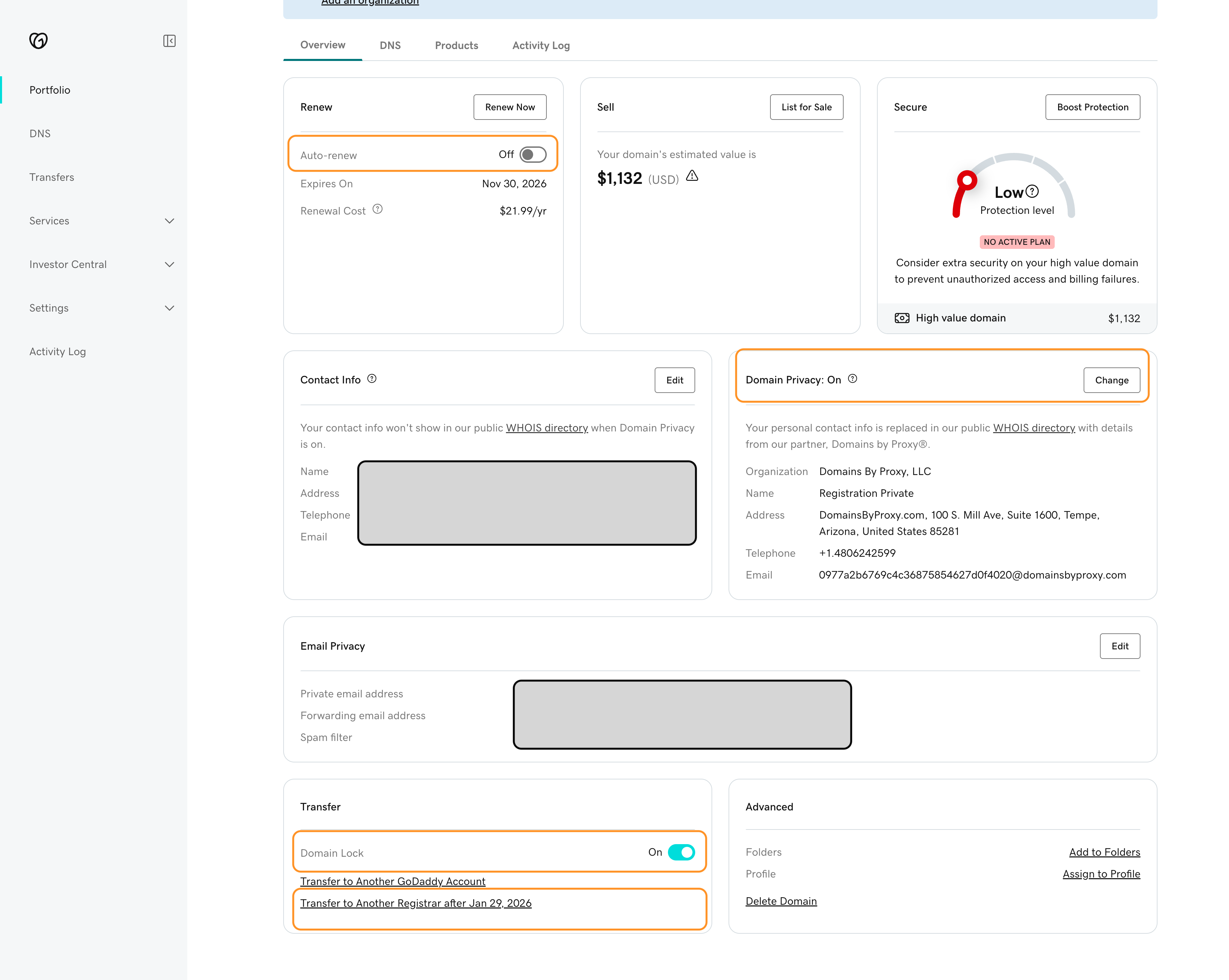
Log into GoDaddy and find your domain’s settings page. Look for the “DNS” or “Domain Settings” section.
1.2 Turn OFF Auto-Renew
In the “Renew” section, toggle Auto-renew to OFF. This prevents conflicts during transfer.
1.3 Turn OFF Domain Lock
Find the “Transfer” section and toggle Domain Lock to OFF.
1.4 Turn OFF Domain Privacy
Find Domain Privacy and click “Change” to disable it. This is required for the transfer to work. You can re-enable privacy at Cloudflare after the transfer.
1.5 Get Your Authorization Code
In the Transfer section, click “Transfer to Another Registrar”
GoDaddy will display the code and email it to you. Save this code—you’ll need it for Cloudflare.
Step 2: Initiate Transfer at Cloudflare
2.1 Go to Cloudflare’s Domain Transfer page
Navigate to: https://dash.cloudflare.com → Domain Registration → Transfer Domains
2.2 Enter your domain
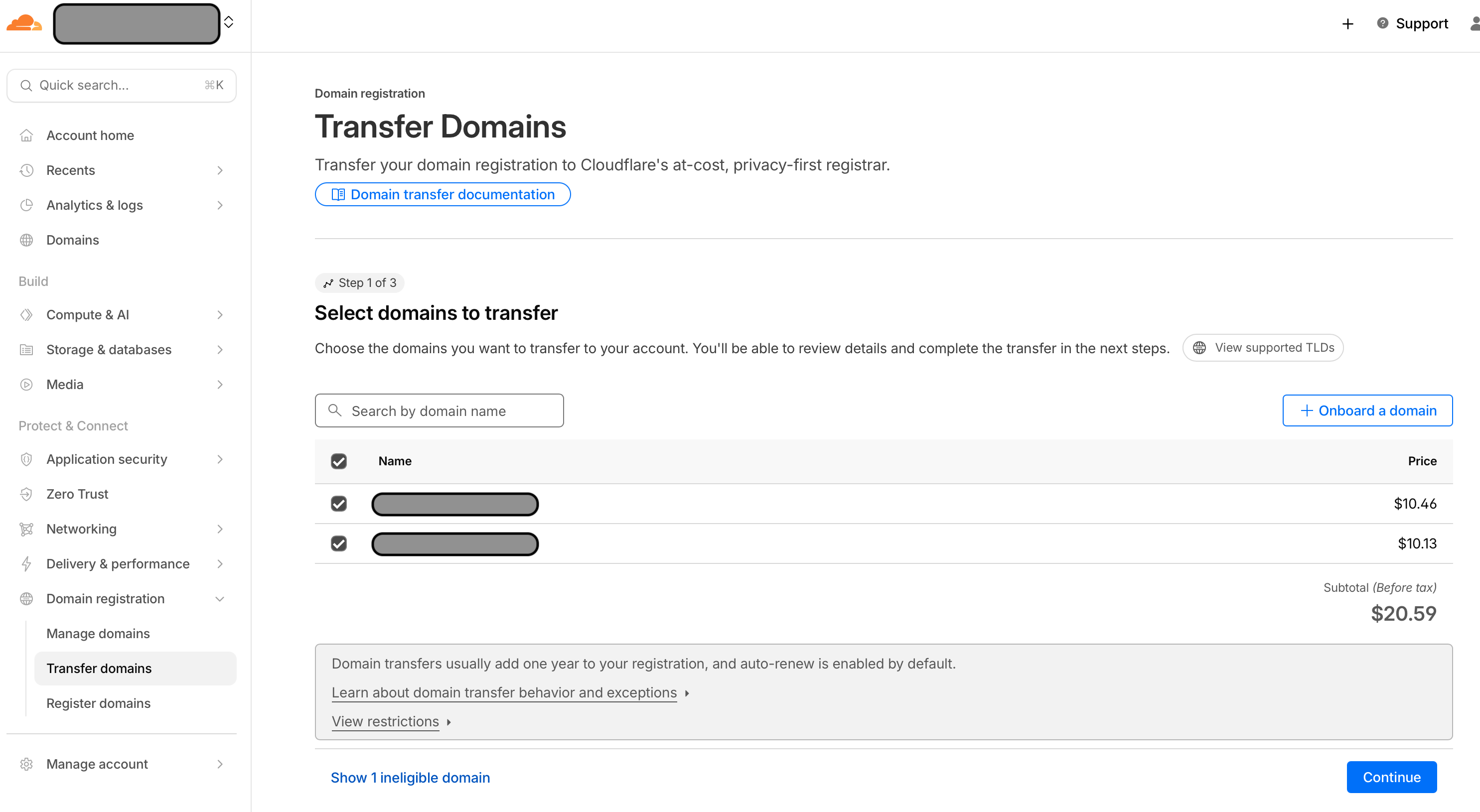
Type your domain name and click Search. Cloudflare will check if the domain is eligible for transfer.
2.3 Enter your authorization code
Paste the auth code you got from GoDaddy.
2.4 Pay the transfer fee
The transfer costs ~$10.11, which extends your registration by 1 year. You’re not losing money—you’re just prepaying for next year at a lower rate.
2.5 Confirm contact information
Review and confirm your WHOIS contact details.
Step 3: Approve the Transfer
3.1 Check your email
You’ll receive emails from both GoDaddy and Cloudflare about the transfer.
3.2 Approve at GoDaddy (this is the secret sauce!)
Go to GoDaddy → Transfers → Transfers Out and click “Approve Transfer”.
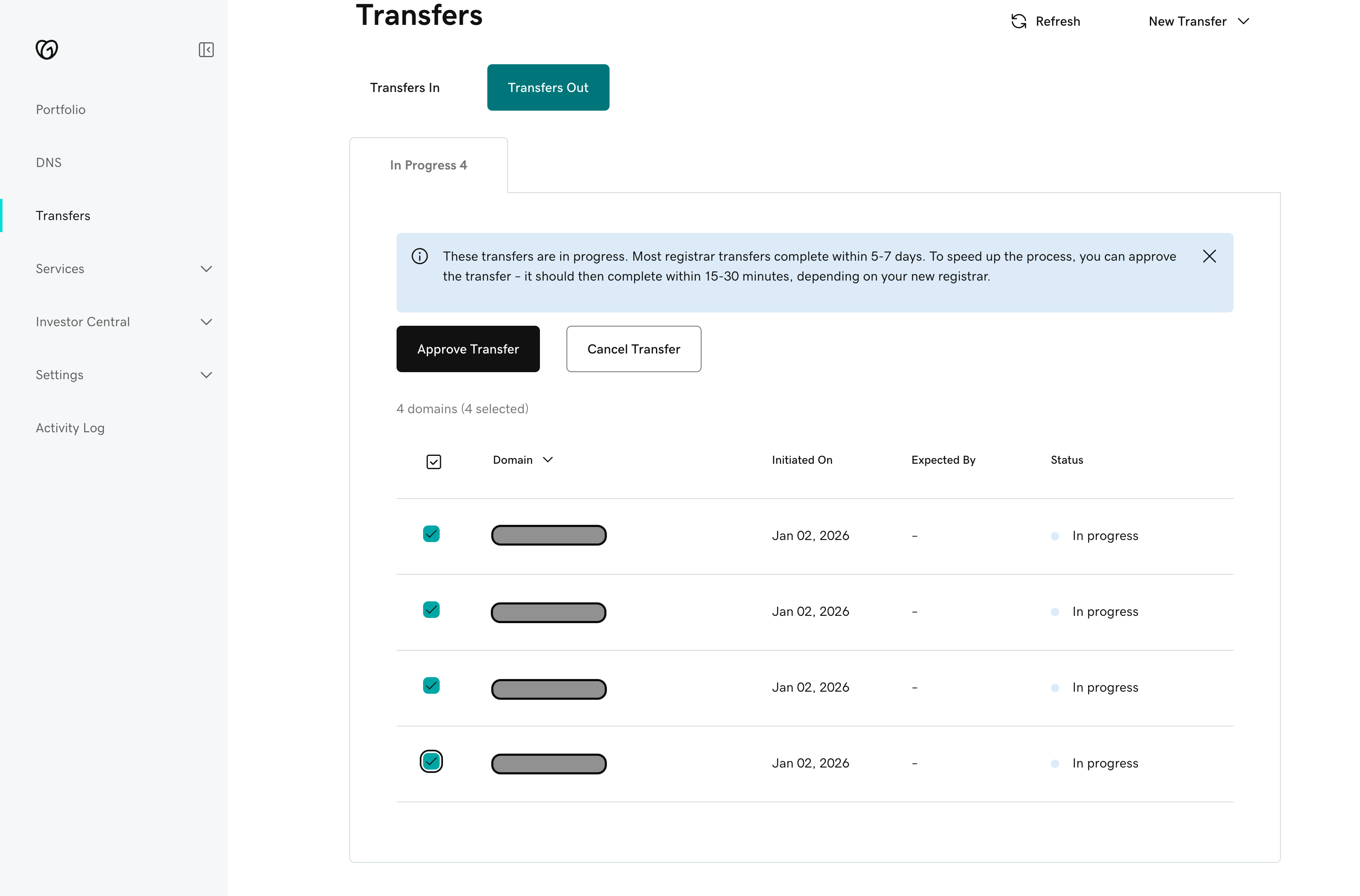
This is the step most people miss. Without approval: - Transfer takes 5-7 days (auto-approves eventually)
With approval: - Transfer completes in 15-30 minutes
I approved immediately and my transfers completed the same day.
Step 4: Verify Success
Once complete, check your Cloudflare dashboard under Domain Registration → Manage Domains.
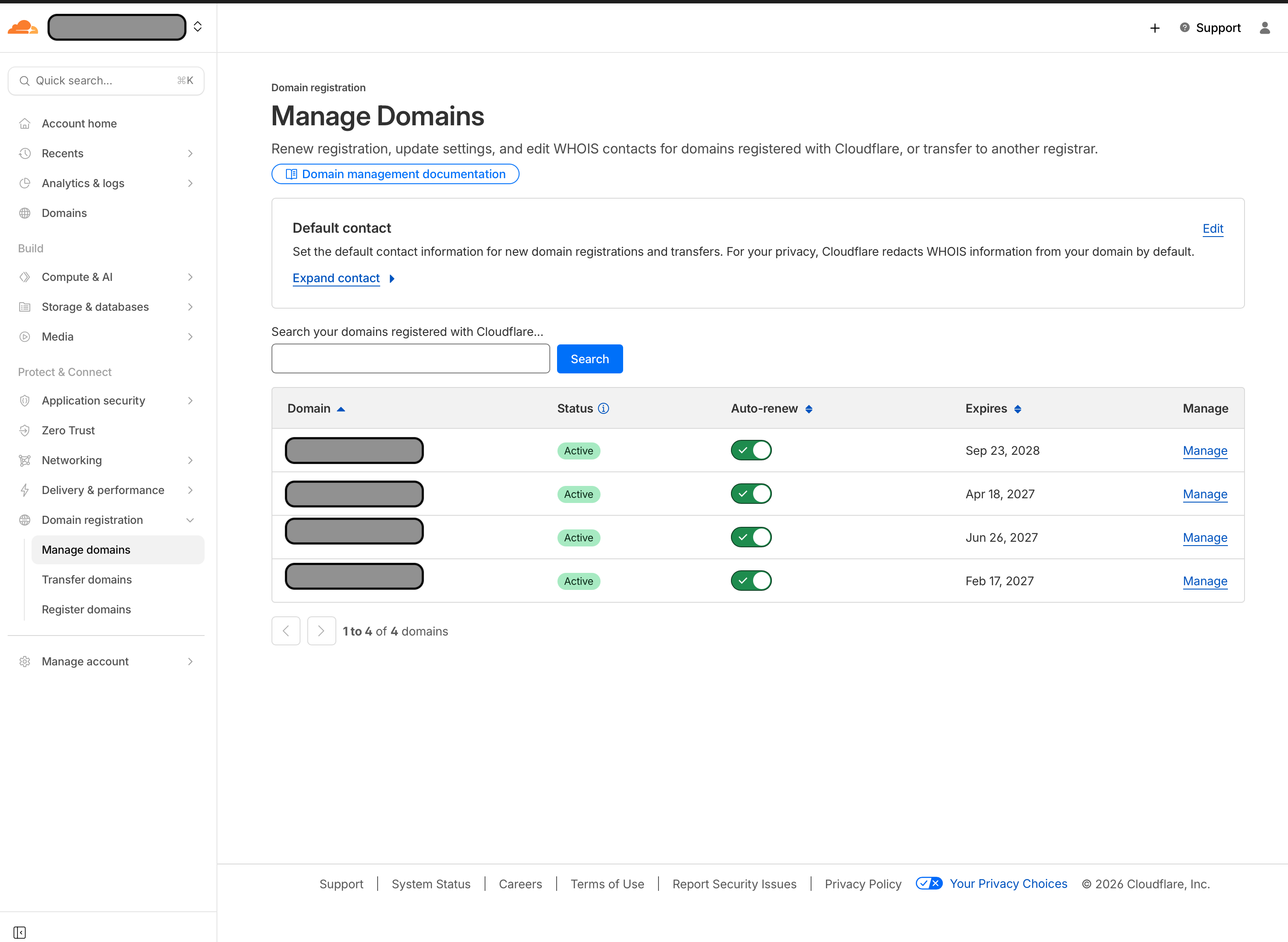
All domains should show as Active with auto-renew enabled.
Gotchas & Troubleshooting
Here’s what tripped me up—so you don’t have to learn the hard way:
“Domain is locked” but I already unlocked it
Problem: Cloudflare shows the domain as locked even though you disabled Domain Lock at GoDaddy.
Solution: WHOIS data can take time to propagate. Try:
1. Wait 10-15 minutes and refresh
2. Toggle the lock OFF → ON → OFF again at GoDaddy to force an update
3. Verify with: whois yourdomain.com | grep Status
Look for Status: ok (not clientTransferProhibited).
Domain shows as “ineligible”
Problem: Cloudflare won’t let you transfer the domain.
Possible causes: - Too new: Domain must be 60+ days old (ICANN rule) - Auto-renew conflict: Try disabling auto-renew at GoDaddy - Expiring soon: Some registrars block transfers within 15-30 days of expiration
Click “Show ineligible domains” in Cloudflare to see the specific reason.
I just bought this domain—when can I transfer?
ICANN requires a 60-day waiting period after registration or previous transfer. Mark your calendar and come back.
Transfer is taking forever
If you didn’t approve the transfer email from GoDaddy, it will auto-approve after 5 days. Check your spam folder for the approval email to speed things up.
The Money Math
Here’s the lifetime cost of my procrastination:
| Domain | Owned Since | Years | Overpaid |
|---|---|---|---|
| mypersonalsite.com | 2003 | 22 | ~$264 |
| familyproject.org | 2014 | 11 | ~$110 |
| sideproject.com | 2015 | 10 | ~$120 |
| mybusiness.com | 2023 | 2 | ~$24 |
| Total | 45 domain-years | ~$518 |
That’s real money I’ll never get back. But starting now, I’ll save ~$58/year, every year.